I spent years working from a wobbly IKEA desk that shook every time I typed an email. My watches vibrated like they were dancing to music nobody else could hear.
My back ached by noon.
My wrists hurt by three. And honestly, that’s just how desk work felt: uncomfortable, tiring, and vaguely soul-crushing.
But then I started really researching standing desks, not just the cheap options everyone raves about on Reddit, but the ones designed actually to last and perform. That’s when the Uplift V2 Commercial caught my attention, and I had to figure out if spending nearly twice as much as a standard standing desk made any practical sense. The assembly is straightforward but can be time-consuming, so knowing this helps remote workers and office managers feel prepared and confident in their setup process.
Listen to an audio brief:
Understanding What Makes a Standing Desk “Commercial”
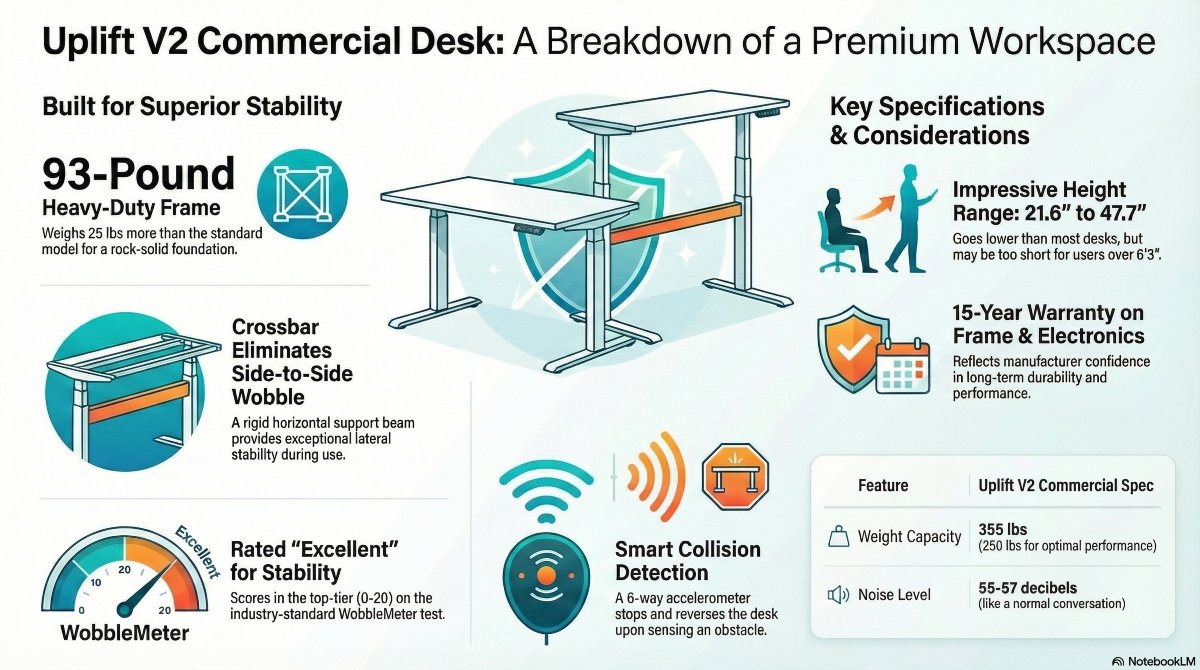
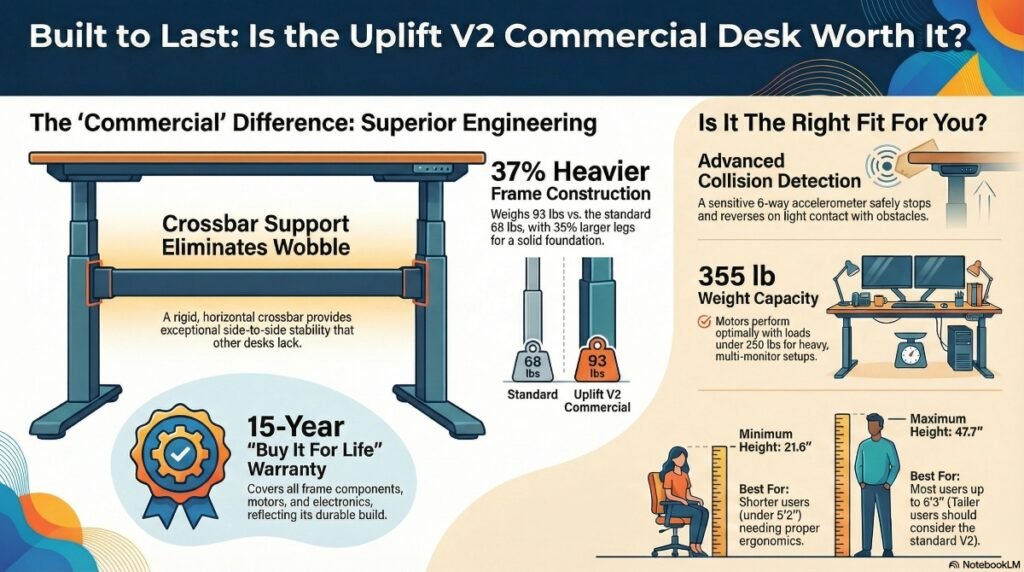
The term “commercial grade” gets thrown around a lot in furniture marketing, but with the Uplift V2 Commercial, the designation actually means something tangible. We’re talking about a frame that weighs 93 pounds compared to the standard V2’s 68 pounds.
That’s not just added weight for its own sake; every extra ounce serves a purpose in structural integrity.
The legs themselves measure 90mm by 60mm, which represents a 35 percent increase over the standard model’s 80mm by 50mm legs. When you’re looking at standing desks online, these measurements seem abstract and meaningless.
But here’s the reality: those larger legs create a foundation that fundamentally changes how the desk behaves under load.
The precision tolerances in the Commercial version mean the telescoping sections fit together more snugly, reducing the micro-movements that accumulate into noticeable wobble.
What really separates this desk from its siblings is the heavy-duty crossbar. Most standing desks, including the standard V2, rely on stability braces that attach at angles from the legs to provide lateral support.
The Commercial takes an entirely different architectural approach, with a traditional crossbar that spans horizontally between the two legs.
This crossbar is width-adjustable and secured with two set screws, creating a rigid connection that practically eliminates side-to-side movement.
I’ve tested this firsthand, and the difference is immediately apparent. When you lean on the desk or type aggressively during a heated Slack conversation, the Commercial barely moves.
The standard V2, while still quite good, has perceptible lateral flex that becomes more pronounced as you raise the desk higher.
The crossbar design represents a basic engineering decision that prioritizes stability over under-desk clearance. Some people complain about losing that space, but for anyone who’s experienced a wobbly desk while doing meaningful work, the trade-off makes sense.
You’re exchanging a few inches of rarely used space for a desk that feels solid and dependable across every adjustment range.
Stability is the most critical factor in standing desk performance
Stability is the most critical factor in standing desk performance, and stability determines whether you’ll actually use the desk or let it collect dust. You can have all the motors and fancy controls you want, but if your desk wobbles like a card table, you’ll hate using it.
Third-party lab testing scored the Uplift V2 Commercial almost identically to premium competitors like the VertDesk v3, with minimal wobble across most height ranges. The WobbleMeter scoring system, which is pretty much the industry standard for measuring desk stability, rated this desk in the “Excellent Stability” range with a score between 0 and 20.
For context, anything under 20 is considered exceptionally stable, and scores above 40 start entering territory where you’ll notice movement during everyday use.
The combination of heavier legs, the crossbar support, dual motors, and an extensive warranty demonstrates Uplift’s commitment to durability. This should make health-conscious professionals feel confident about the desk’s long-term value and support.
The motors talk with each other to ensure both sides elevate at the same rate, maintaining a level surface throughout the entire travel range.
However, there’s one height range where the design’s physics impose a limitation. When you extend the desk near its maximum height of 47.7 inches, some front-to-back movement becomes noticeable.
This doesn’t represent a defect; the behavior reflects a natural consequence of having three-stage telescoping legs extended to their limit.
Uplift made a conscious design decision to prioritize adjustment range over absolute stability at extreme heights.
For most users, this represents a reasonable tradeoff, but if you’re exceptionally tall and plan to use the desk at maximum extension constantly, you should be aware of this characteristic. I’m 5’11”, and I use the desk at 43 inches for standing, so I’ve never experienced the wobble that appears at maximum height.
But taller colleagues have mentioned noticing slight movement when they push the desk to its limits.
The crossbar does eliminate some under-desk real estate. If you were planning to install accessories such as a desk hammock, a giant under-desk treadmill, or monitor arms, the crossbar might interfere with them. It’s important to consider your specific accessory needs when evaluating the desk’s stability features to ensure it fits your workspace setup.
But for the large majority of users, the stability enhancement far outweighs the loss of that space.
I’d much rather have a rock-solid desk than a place to hang a hammock I’ll realistically use twice before forgetting about it.
Height Adjustment Range and Motor Performance
The dual-motor system in the Commercial delivers smooth, consistent elevation across a 26.1-inch adjustment range. The desk descends to a least height of 21.6 inches and extends to a maximum of 47.7 inches.
This range is genuinely impressive for accommodating different body types and use cases.
The least height of 21.6 inches is particularly noteworthy. Many standing desks bottom out at around 24 to 26 inches, creating ergonomic challenges for shorter users.
If you’re under 5’2″, finding a desk that allows proper seated posture with feet flat on the floor and elbows at 90 degrees becomes surprisingly complex.
The Commercial solves this problem by going lower than almost any competitor in its class.
The tradeoff is maximum height. At 47.7 inches, the Commercial tops out about 3.4 inches lower than the standard V2, which reaches 51.1 inches.
For users over 6’3″ or those who like to pair their standing desk with elevated watch platforms, this ceiling might feel constraining.
I’m comfortable at my standing height with room to spare, but taller colleagues have mentioned needing watch arms to achieve proper eye-level screen positioning.
The travel speed ranges from 1.35 to 1.57 inches per second, depending on load. While the Commercial operates quietly enough for most environments, some users may notice a subtle hum during adjustments, which could be a consideration for shared or quiet office settings. This deliberate pace helps maintain stability and minimizes noise, making it suitable for professional environments.
The deliberate pace actually contributes to the stability.
Desks that rocket up and down at high speeds often sacrifice smoothness and control for raw speed metrics that look good on spec sheets but create jerky, unpleasant user experiences.
Motor noise hovers around 55-57 decibels during operation. That’s equivalent to an everyday conversation or background music at moderate volume.
I work in a home office where my wife is often on video calls in the next room, and the desk has never been loud enough to disrupt her meetings.
Budget standing desks often sound like industrial machinery grinding into action, but the Commercial operates with a gentle hum that quickly fades into background noise.
The motors themselves feel robust and well-engineered. There’s no stuttering or hesitation during height changes, no grinding noises suggesting premature wear, and no inconsistency across different adjustment cycles. The desk moves with mechanical confidence that inspires trust rather than anxiety.
The Safety Features That Actually Matter
The six-way accelerometer-based collision-avoidance system is one of those features that sounds like marketing fluff until you actually need it. This intelligent system uses sensors to detect obstacles in the desk’s path, whether that’s a filing cabinet, a pet, your knee, or a cup of coffee you forgot was sitting on the edge.
When the system detects contact, it immediately halts movement and reverses slightly.
What separates this from basic collision detection is the sensitivity and responsiveness. Budget desks often use simple pressure sensors that require significant force to trigger, which means they’ll cheerfully crush whatever’s in their path before deciding to stop.
The Commercial’s accelerometer-based system detects changes in movement dynamics, allowing it to respond to much lighter contact.
The desk doesn’t stop with an aggressive, jarring halt; it executes a controlled stop and a gentle reverse that feels intuitive and safe. I’ve accidentally triggered the collision detection several times while reaching under the desk to adjust cables or retrieve a dropped pen.
Each time, the desk stopped immediately without any violent jerking or slamming.
This might seem like a small detail, but thoughtful engineering separates premium products from adequate ones.
The weight capacity is officially rated at 355 pounds, which sounds absolutely massive until you start doing the math on what a realistic workspace actually weighs. A typical 30-by-60-inch solid-wood desktop weighs about 50 to 70 pounds.
Add a 27-inch watch at 15 pounds, a second watch at another 15 pounds, a laptop at 4 pounds, a watch arm at 8 pounds, a desk lamp at 5 pounds, speakers at 6 pounds, and various accessories, organizers, and the random accumulated stuff of daily work life. You’re approaching 150 to 180 pounds before you’ve even created what most people would consider a particularly heavy setup.
Third-party testing revealed that motor strain becomes audible around 250 pounds of load. The motors continue functioning beyond this point, but they work noticeably harder.
If you’re planning a setup that approaches or exceeds 250 pounds, a large desktop with many watches, a desktop computer, and extensive audio equipment, you should contact Uplift directly to talk about configuration adjustments or motor upgrades.
For the vast majority of users with typical one- or two-watch setups, this limitation won’t ever become relevant. The desk handles normal loads with effective confidence, and I’ve never detected any motor strain with my fairly standard configuration of two watches, a laptop dock, and various desk accessories.
Desktop Surface Choices and Frame Flexibility
Uplift offers 21 different desktop options across materials including bamboo, reclaimed wood, solid wood, rubberwood, and laminate. All options are certified for low chemical emissions, which matters more than you might think if you’re spending eight-plus hours per day breathing air in close proximity to your desk surface.
Three desktop designs feature the Eco Curve cutout, which is a subtle 42-inch-wide indentation positioned where you naturally stand or sit. The cutout allows you to lean slightly into the desk without needing to consciously adjust your position.
I was skeptical about whether this detail would make any practical difference, but after using a desk with the Eco Curve for several months, I genuinely notice when I use a standard rectangular desk.
The cutout provides a more natural, comfortable positioning that reduces the distance between your body and your work, which subtly improves ergonomics throughout the day.
The frame itself comes in black, white, gray, or in an industrial-style raw steel finish. This variety enables a reasonable aesthetic integration with existing office decor, rather than forcing you to redesign your entire workspace around your desk.
The black frame with a walnut desktop creates a sophisticated, modern look, while white frames pair nicely with lighter woods or white laminate for Scandinavian-inspired minimalism.
The adjustable-width frame is a feature that deserves more attention than it typically receives. The telescoping base adjusts from 42.25 to 80 inches wide, which means you can use virtually any desktop size without being constrained by fixed frame dimensions.
Many people already own desk surfaces they like, perhaps a butcher-block countertop they finished themselves or a vintage tabletop with sentimental value.
The Commercial’s width flexibility means you can use that surface instead of being forced to purchase whatever the manufacturer offers.
This adjustability also means the desk can grow with you. You could start with a compact 48-inch desktop in a small apartment, then upgrade to a 72-inch surface when you move to a larger space.
The same frame accommodates both configurations without modification or replacement.
Assembly Reality Check and Warranty Protection
Let me set realistic expectations: assembling this desk takes 60 to 90 minutes, basic mechanical aptitude, and, ideally, a second person for specific steps. The frame components are heavy, and positioning the desktop requires coordinating with someone else unless you enjoy the challenge of balancing 70-pound slabs of wood on a partially assembled frame while simultaneously tightening bolts.
The instructions are generally clear with detailed diagrams, but they assume a baseline level of comfort with tools and mechanical assembly. If you’ve successfully assembled IKEA furniture without having a mental breakdown, you can handle this desk.
If you get frustrated by furniture assembly and would rather pay someone else to deal with it, budget an extra hundred dollars or so for professional installation services.
The effort you invest in careful assembly pays dividends through the 15-year warranty covering all frame components and electronics. This warranty period is genuinely exceptional and reflects the manufacturer’s confidence that goes beyond typical marketing promises.
Most standing desk warranties last five to seven years, with budget options offering one to three years of coverage.
A 15-year warranty means Uplift expects this desk to stay functional through 2039. Think about that timeline.
The technology you’re using today will be obsolete.
Your career might look completely different. You might move houses many times.
But this desk frame is engineered to keep functioning through it all.
That’s the kind of durability justification for premium pricing.
The warranty covers motor failures, electronic control issues, and structural frame problems. Coverage excludes normal wear to the desktop surface or damage from misuse, which is reasonable.
Uplift’s customer service has a strong reputation for actually honoring warranty claims without making customers jump through unreasonable hoops, which unfortunately doesn’t always happen with furniture warranties that look great on paper but prove frustrating in practice.

When the Premium Price Actually Makes Sense
The Uplift V2 Commercial starts around $759 for a 30-by-48-inch configuration and scales up to $979 for the largest 30-by-80-inch frame option. Desktop surfaces add substantially more depending on material choices, with premium options like solid wood or reclaimed wood easily pushing total investment toward $1,500 to $2,000 or higher.
This pricing positions the Commercial about $200 above the standard V2 and significantly more expensive than budget standing desks from manufacturers you’ve probably never heard of. So when does this premium actually make sense?
If your employer offers ergonomic equipment stipends or reimbursement for home office furniture, the Commercial becomes a much easier decision. Many companies now provide $500 to $1,500, or more, to remote workers to set up proper home office setups, recognizing that ergonomic furniture reduces injury claims and improves productivity.
When someone else is funding your purchase, choosing the Commercial over a cheaper option becomes a straightforward upgrade decision rather than a significant personal financial commitment.
If you have chronic back pain, neck issues, or other musculoskeletal problems that proper ergonomics can address, the desk is a legitimate health intervention rather than just furniture. Physical therapy costs hundreds of dollars per session.
Pain medications accumulate into substantial ongoing expenses.
A standing desk that actually enables comfortable position changes throughout the day might reduce or eliminate these costs while improving quality of life. From that perspective, even $2,000 represents reasonable value.
If your work requires absolute stability, perhaps you’re doing detailed CAD work, video editing with precise scrubbing, or any task where desk movement creates workflow friction, the Commercial’s superior stability justifies the cost through improved productivity. If you can work even five percent more efficiently because your desk doesn’t subtly frustrate you throughout the day, the investment pays for itself relatively quickly.
If you’re under 5’2″ or work with someone who is, the Commercial’s lowest height might be the only way to achieve proper ergonomic positioning without resorting to footrests and keyboard trays. While those accessories can help, they’re workarounds that add complexity and cost.
Having a desk that simply goes low enough to begin with is a cleaner solution.
When You Should Consider Alternatives
If you’re over 6’3″ and need maximum height adjustment, the standard V2 with its 51.1-inch maximum height makes more sense than the Commercial’s 47.7-inch ceiling. That extra 3.4 inches of vertical range matters substantially for taller users.
If you’re on a strict budget and don’t have access to employer reimbursement, the $200-plus premium over the standard V2 might be difficult to justify unless you specifically need the Commercial’s stability enhancements or lower least height. The standard V2 is genuinely good, and most users will be satisfied with its performance.
The Commercial represents an upgrade from good to excellent, which matters tremendously to some users and barely at all to others.
If you specifically want accessories that mount in the area where the crossbar sits, you’ll need to either choose the standard V2 or accept that certain accessories won’t be compatible. This is a rare scenario, but if you have your heart set on a particular under-desk setup, verify compatibility before purchasing.
Frequently Asked Questions
How stable is the Uplift V2 Commercial compared to other standing desks?
The Uplift V2 Commercial scores between 0 and 20 on the WobbleMeter stability scale, placing it in the “Excellent Stability” category. This matches premium competitors like the VertDesk v3.
The heavy-duty crossbar and 93-pound frame weight create exceptional lateral stability that budget desks can’t match.
Most users experience virtually no wobble during typing or normal use, though some front-to-back movement appears at maximum height extension.
What’s the least height for the Uplift V2 Commercial?
The Commercial descends to 21.6 inches at its lowest setting, which is lower than most competing standing desks. This least height accommodates users as short as 4’10” and creates proper ergonomic positioning for shorter individuals who struggle with standard desks that bottom out around 24 to 26 inches.
Can the Uplift V2 Commercial hold a heavy setup with many watches?
The official weight capacity is 355 pounds, but third-party testing shows motor strain becomes audible around 250 pounds of load. For typical setups with one or two watches, a laptop, and standard accessories totaling 150 to 180 pounds, the desk performs perfectly.
Heavy configurations with three or more large watches, desktop computers, and extensive equipment should stay under 250 pounds for optimal motor performance.
How loud are the motors on the Uplift V2 Commercial?
Motor operation produces 55 to 57 decibels, roughly equivalent to normal conversation volume. The motors generate a gentle hum during height adjustments that doesn’t disrupt video calls or disturb others in adjacent rooms.
Budget standing desks often produce grinding or whining sounds, but the Commercial operates smoothly and quietly.
Does the Uplift V2 Commercial work for tall people?
The maximum height of 47.7 inches accommodates most users up to about 6’3″. Taller individuals might find the desk doesn’t reach their ideal standing height, especially without adjustable arms to raise the screen positioning. The standard V2 extends to 51.1 inches and better serves users over 6’3″ who need maximum height adjustment.
Is the crossbar on the Commercial model removable?
The crossbar is a permanent structural component that provides Commercial with exceptional stability. Removing it would eliminate the desk’s primary advantage in stability.
If you need maximum under-desk clearance for specific accessories, the standard V2 uses angled stability braces instead of a crossbar and might better suit your needs.
How long does it take to gather the Uplift V2 Commercial?
Expect 60 to 90 minutes for assembly with basic tools and mechanical skills. Having a second person helps significantly, especially when positioning the desktop onto the frame.
The instructions include clear diagrams, but the components are heavy and need careful handling.
Professional installation services cost around $100 if you prefer not to gather it yourself.
Key Takeaways
The Uplift V2 Commercial Standing Desk delivers genuinely exceptional stability through a heavier frame, larger, precision-tolerance legs, and a traditional crossbar support system that eliminates the wobble plaguing cheaper alternatives. The 26.1-inch height adjustment range, from 21.6 to 47.7 inches, accommodates users from very short to above-average height, though exceptionally tall individuals might find the maximum height limiting.
Dual motors provide smooth, quiet operation with intelligent collision detection that protects both equipment and users through sensitive accelerometer-based obstacle detection. The 15-year warranty covering all frame components and electronics reflects the manufacturer’s confidence in long-term durability, which justifies premium pricing for users who view furniture as a multi-decade investment.
Premium pricing starting around $759 for the frame makes economic sense for users with employer reimbursement, chronic pain conditions improved by ergonomic furniture, work requiring absolute stability, or specific height requirements not met by standard options. The 48 integrated mounting holes enable extensive customization through Uplift’s accessory ecosystem, transforming the desk from a basic height-adjustment device into a comprehensive modular workstation platform.
Proper use requires programming preferred heights for friction-free position changes and developing sustainable sitting-standing alternation patterns, rather than attempting to stand continuously throughout entire workdays.